
Why Two Websites Can Look Identical—But One Can Steal Your Password
It starts with an email that looks completely ordinary. It's from "Google." The subject line mentions a security alert on your account. The logo is right. The formatting is right. Even the tone sounds like something Google would actually send.
Here's the unsettling part: you didn't make a careless mistake. You did the thing every security training tells you to do — you checked the URL. And it looked correct, because in a very real sense, it was designed to.
This is the idea behind a homograph attack, also known as Unicode phishing or IDN phishing — one of the quieter, more effective tricks in a phisher's toolkit, precisely because it targets the one habit most of us were taught to trust: "check the address bar."
Here's how it works, why browsers can't always catch it, and what actually stops it.
What Is a Homograph Attack?
A homograph attack is a phishing technique where attackers register a domain name that visually looks identical to a legitimate, trusted domain — but is technically a completely different web address pointing to a server the attacker controls.
The term borrows from linguistics, where a homograph is a word spelled the same as another word but with a different meaning. In cybersecurity, it describes individual characters that look the same but are technically different under the hood.
Think of it like two car keys that look absolutely identical — same shape, same logo. One opens your car. The other was cut to open a different car that merely looks like yours. You'd have to check a serial number stamped inside to tell them apart, something almost nobody does.
Why This Works: A Quick Unicode Primer
Every character on your screen is stored by computers as a number. Unicode is the global standard that assigns a unique number to virtually every character in every written language, which is why the same website can display correctly in English, Arabic, or Mandarin.
To support this, the web introduced Internationalized Domain Names (IDNs) — domain names that can include non-Latin scripts like Cyrillic, Greek, or Arabic, rather than only the 26 Latin letters domains originally relied on.
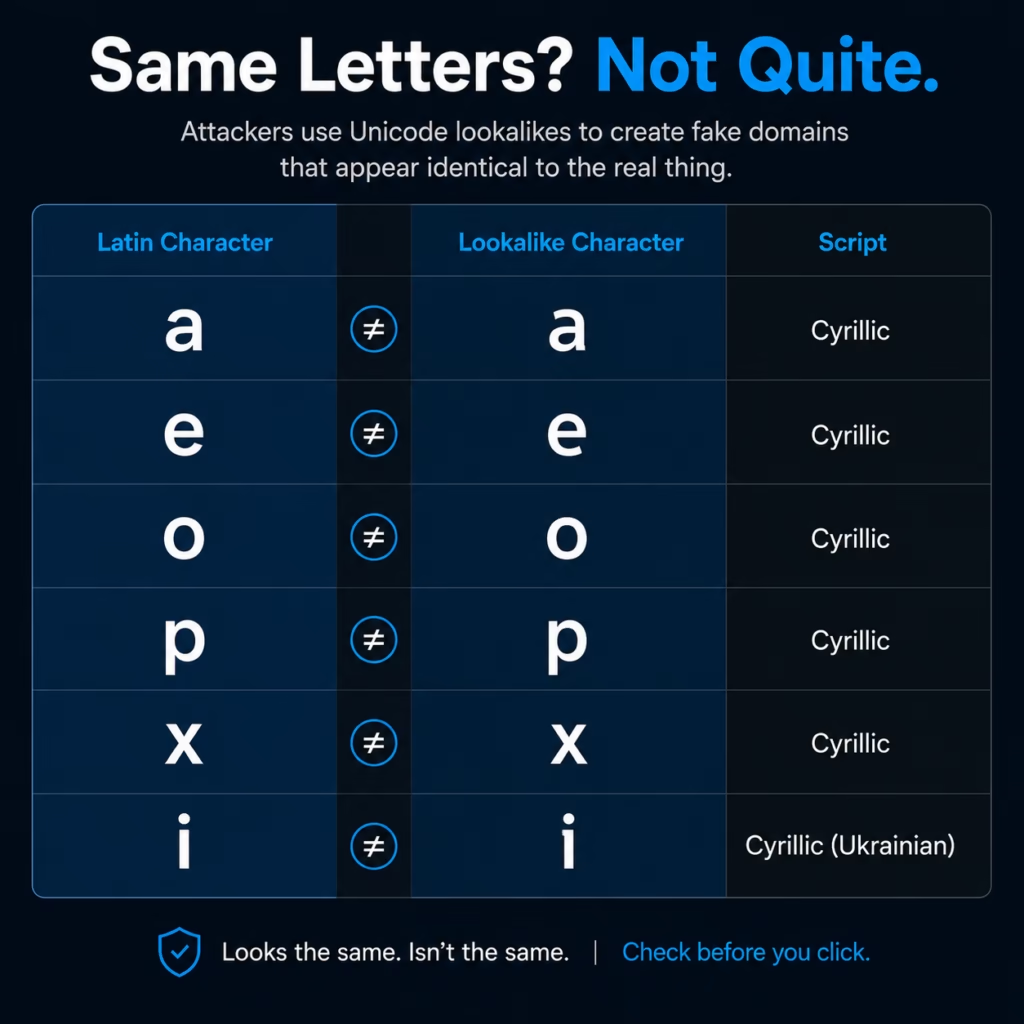
To your eyes, each pair looks the same. To a computer, a domain using the Cyrillic "о" is a completely different domain from one using the Latin "o," even though no human can tell them apart at a glance.
How Attackers Pull This Off
- Pick a high-value target brand — banks, email providers, cloud platforms, or payment services people trust and log into often.
- Register a lookalike domain, swapping one or more letters for visually identical characters from another script. Registration is fast, cheap, and rarely flagged at the point of purchase.
- Clone the real login page using widely available phishing kits that copy the HTML, CSS, and branding almost exactly.
- Drive traffic to it through phishing emails, SMS messages, malicious ads, or social posts.
- Harvest credentials as victims log in — often redirecting them to the real site afterward so nothing seems obviously wrong.
Because registration is so cheap, sophisticated actors often register dozens of variants of one brand at once, rotating through them as security teams take individual domains down.
What This Looks Like in Practice
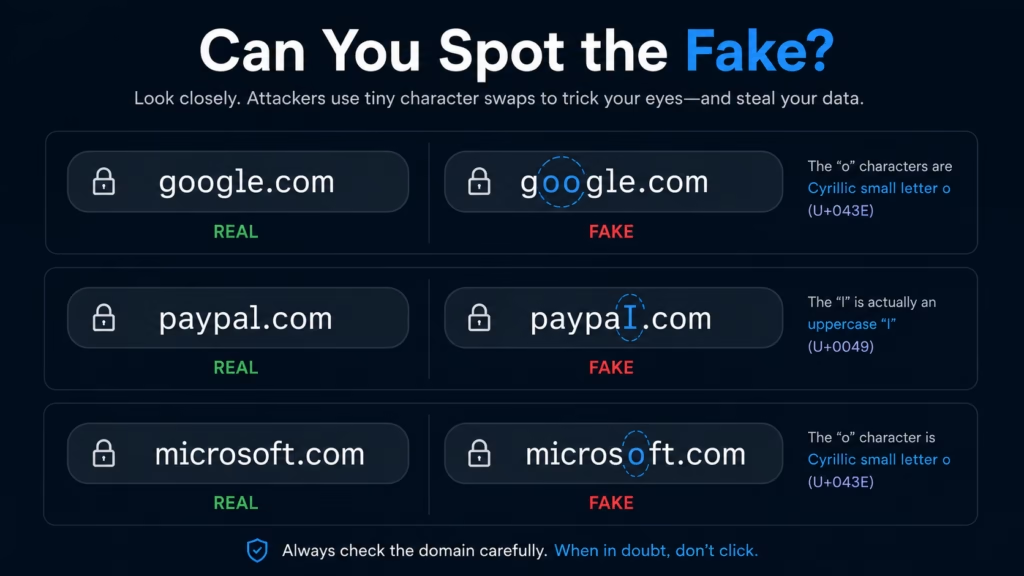
Can You Spot the Fake?
Data Records Exposed
How Browsers Handle This — and Where They Fall Short
Domain names still technically rely on a limited character set, so IDNs are translated behind the scenes using Punycode, an encoding system that converts Unicode characters into an ASCII-compatible string prefixed with xn--.
Chrome, Firefox, Edge, and Safari all include protections that convert suspicious mixed-script domains (Latin combined with Cyrillic, for example) into visible Punycode. The limitation: a domain built entirely from a single foreign script that happens to resemble Latin letters is much harder to flag automatically, since nothing about it is technically "mixed."
How to Protect Yourself
- Use a password manager. This is the single most effective individual defense — password managers match credentials to the exact technical domain, not its appearance, and won't auto-fill on a lookalike domain.
- Bookmark sites you log into often instead of clicking links in emails or messages.
- Hover before you click to preview the real destination — though this doesn't work for QR codes, so be extra cautious there.
- Verify the sender for anything urgent or financial. A quick phone call beats a quick click.
- Enable multi-factor authentication (MFA). It won't stop every attack, but it adds a meaningful barrier.
- Keep your browser and software updated, since IDN protections improve over time.
How Organizations Should Defend Against It
Individual habits matter, but organizations carry the heavier load — both for employees and for customers who could be impersonated:
- Security awareness training that specifically covers homograph and Unicode-based examples, not just generic phishing warnings.
- DNS filtering to block known malicious domains before a connection is established.
- Email security gateways that flag messages from newly registered or mixed-script domains.
- Brand and domain monitoring to catch new lookalike registrations targeting your name early.
- SOC monitoring for anomalous logins — impossible travel, unfamiliar devices — to catch compromise quickly.
- Keep your browser and software updated, since IDN protections improve over time.
The Bottom Line
The core lesson of the homograph attack is uncomfortable but important: what a website looks like tells you almost nothing about whether it's safe. Logos can be copied. Layouts can be cloned. Even the URL itself — the thing we're trained to "just check" — can be manufactured to deceive at a level most people will never notice without specialized tools.
That doesn't mean you're defenseless. The right defenses just live a layer beneath what your eyes can verify: password managers that check exact domains, MFA that adds friction attackers can't easily bypass, and organizational monitoring that catches impersonation before it reaches an inbox.
If this kind of threat breakdown was useful, follow RSecurity for more practical, no-fluff cybersecurity insights the kind built for people who actually have to defend real systems.
FAQs
What is a homograph attack?
A homograph attack is a phishing technique where attackers register a domain using characters from different alphabets that look visually identical to letters in a legitimate domain. The fake domain is technically a different address entirely, but since the characters render the same on screen, victims often can’t tell it apart from the real site — making it effective for fake login pages and credential theft.
What is Punycode?
Punycode is an encoding system that converts Unicode characters in domain names into an ASCII-compatible string, prefixed with xn--, so internationalized domain names can work with existing domain name systems. Browsers use Punycode behind the scenes and sometimes display it directly in the address bar as a security signal when a domain looks potentially deceptive.
Can password managers stop homograph attacks?
Yes — this is one of their most underrated benefits. Password managers store credentials tied to the exact technical domain, not its visual appearance. On a homograph domain that merely looks like your bank’s website, your password manager won’t recognize it as a match and won’t auto-fill your credentials, even though the page looks identical to you.
Are HTTPS websites always safe?
No. HTTPS only confirms the connection between your browser and the server is encrypted — it says nothing about who controls that server. Certificate authorities verify domain ownership, not brand identity, so a homograph phishing site can have a fully valid HTTPS certificate and still show the padlock icon while stealing credentials.
Can multi-factor authentication (MFA) stop phishing?
MFA significantly reduces the damage of credential theft, since a stolen password alone usually isn’t enough to access an account. It’s not a perfect defense, though — sophisticated attackers use real-time phishing proxies that capture passwords and MFA codes simultaneously. MFA should be treated as one important layer, not a complete solution on its own.
Can Chrome or other browsers detect fake domains?
Major browsers convert suspicious domains into visible Punycode when a domain mixes scripts in unusual ways, such as combining Latin and Cyrillic characters. Detection is less reliable against domains built entirely from a single foreign script that closely resembles Latin letters, since nothing about that domain is technically “mixed” — it’s a valid domain in its own right.
What should I do if I entered my password on a fake website?
Change the password for that account immediately, ideally from a separate, verified device. If you’ve reused that password elsewhere, change it there too, and enable MFA if it isn’t already active. Monitor the account for unfamiliar activity, and notify your organization’s IT or security team if the account is work-related.
How do companies defend against lookalike domains?
Organizations typically layer several defenses: brand and domain monitoring to catch new lookalike registrations early, email security gateways, DNS filtering, employee training that specifically covers Unicode-based phishing, and sometimes proactively registering common lookalike variants of their own domain before attackers can.
Is it safe to click links sent by text message from my bank?
It’s safer to avoid clicking links in unsolicited text messages, even ones that appear to be from your bank. Open your banking app directly or type the known web address manually instead. SMS phishing frequently uses lookalike domains, and text messages make it especially hard to inspect a link before tapping.
Are small businesses targeted by homograph attacks, or just large brands?
Large, recognizable brands are common targets due to their broad customer base, but small and mid-sized businesses are increasingly targeted too — particularly through business email compromise, where attackers impersonate a vendor or partner’s domain to redirect payments. No organization is too small to be worth impersonating if money or sensitive data is involved.