
What to Do If You Click a Phishing Link: Your Step-by-Step Guide to Safety
Clicking a phishing link doesn't automatically mean your device or accounts are compromised — but the next few minutes matter. If you act quickly, you can usually stop an attack before it does real damage. This guide walks you through exactly what to do if you click a phishing link, whether or not you entered a password, and how to make sure it doesn't happen again.
Definition of Phishing
Phishing is a cyberattack where someone impersonates a trusted source — a bank, a coworker, a delivery service, even your own IT department — to trick you into clicking a malicious link, downloading an infected file, or handing over sensitive information like passwords or card numbers. It's called "phishing" because attackers cast a wide net of fake messages, hoping someone bites.
Common Types of Phishing Attacks
- Email phishing ~ mass-sent fake emails that look like they're from a legitimate company
- Spear phishing ~ targeted attacks aimed at a specific person, often using personal details to seem credible
- Smishing ~ phishing delivered via SMS text message, often with urgent "verify your account" language
- Clone phishing ~ a copy of a legitimate email you've received before, with the link swapped for a malicious one
- Business email compromise (BEC) — attackers impersonate an executive or vendor to request a wire transfer or sensitive data
What to Do If You Click a Phishing Link: Immediate Steps
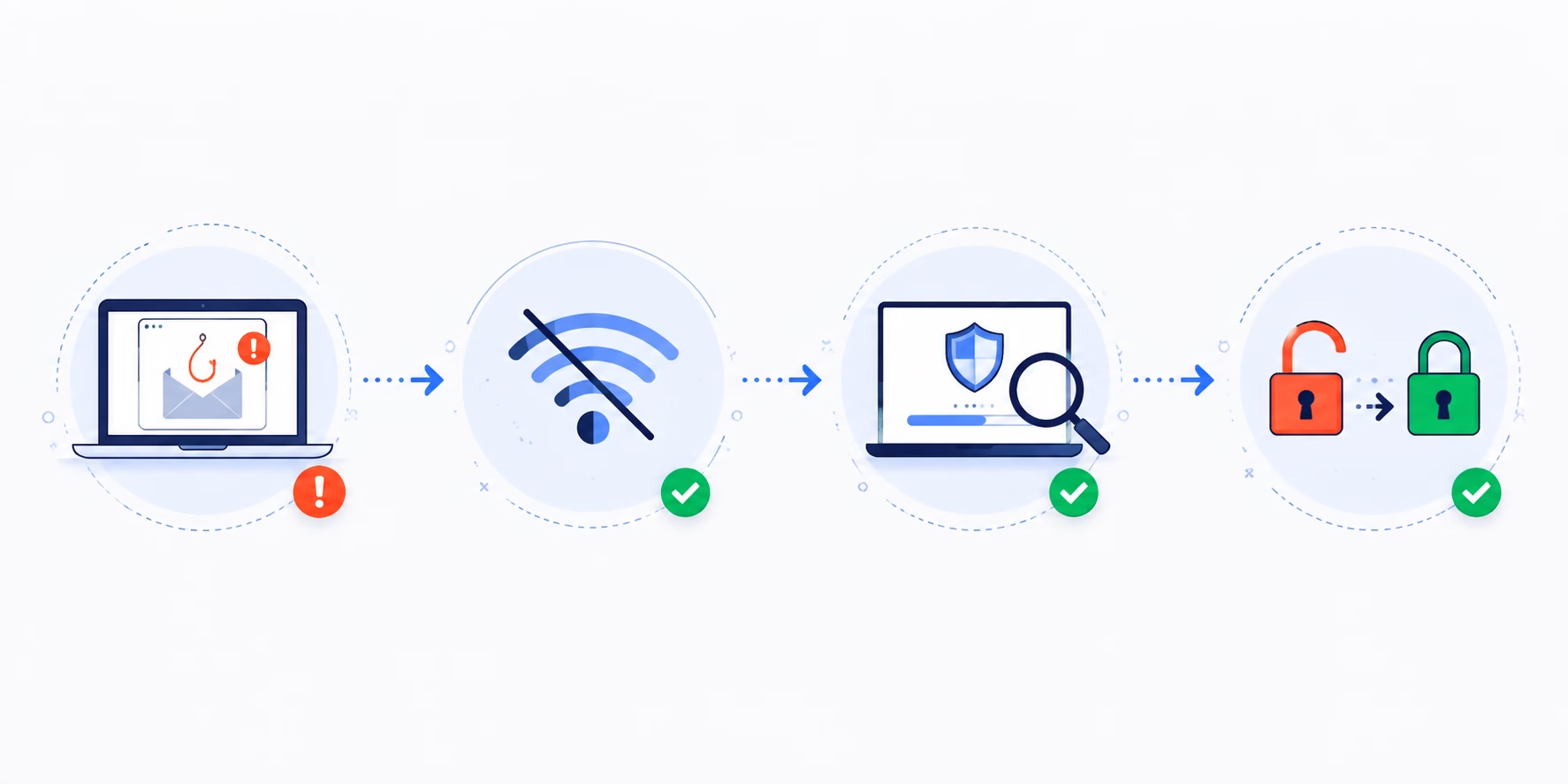
If you clicked a phishing link, here's the order of operations:
To stay safe, always:
- Don't enter any information if a page asks for it — close the tab immediately.
- Disconnect from the internet (see below) to stop any background processes from communicating with an attacker's server.
- Run a full antivirus/anti-malware scan on the device you used.
- Change your passwords — starting with the account the phishing attempt impersonated, then any account using the same password.
- Enable two-factor authentication (2FA) if it isn't already on.
- Report the phishing attempt to your email provider and, if it happened at work, to your IT or security team. You can also report it directly to the FTC at ReportFraud.ftc.gov.
If you also entered a password on the fake page, treat that account (and any account sharing the same password) as compromised — change it immediately from a different, trusted device.
Checking for Malware Installation
Some phishing links don't just steal credentials — they trigger a silent download in the background. Signs of malware infection include:
Disconnecting from the Internet
If you suspect malware may have installed itself, disconnect the device from Wi-Fi or unplug the ethernet cable right away. This cuts off the connection between the malware and the attacker's server, preventing it from transmitting stolen data or receiving further instructions. Keep the device offline until you've completed a full malware scan.
What Happens If You Click on a Phishing Link?
The outcome depends on what the link actually did. Broadly, clicking a phishing link can lead to one of a few scenarios:
- Nothing happens — some links are simply broken or the payload fails to execute.
- Malware installs silently — spyware, keyloggers, or ransomware begin running in the background.
- You land on a fake login page — designed to steal whatever credentials you enter.
- Scan all connected devices to ensure none remain infected.
- Your device joins a botnet — used by attackers for larger-scale attacks without your knowledge.
Because you often can't tell which scenario occurred just by looking, it's safest to treat every click as a potential compromise until you've confirmed otherwise.
Reviewing Financial Accounts
If there's any chance your banking or payment information was exposed, log into your accounts directly (never through a link from the suspicious message) and check for:
Consider placing a fraud alert or credit freeze with the major credit bureaus if you believe financial data was exposed, and contact your bank's fraud department directly using the number on the back of your card.
Monitoring Personal Information
Beyond finances, keep an eye on:
Preventative Measures for the Future
- Enable spam and phishing filters at the highest safe setting
- Verify sender addresses carefully — attackers often use lookalike domains
- Hover over links before clicking to preview the actual URL
- Never enter credentials after clicking a link in an unsolicited email; navigate to the site directly instead
Using Password Managers
A password manager reduces phishing risk in two ways: it generates unique, strong passwords for every account (so one stolen password doesn't compromise others), and most password managers won't autofill credentials on a fake lookalike domain — an easy way to spot you're on the wrong site before you type anything.
Educating Yourself About Phishing Tactics
Phishing attacks are constantly evolving, but the underlying psychology stays the same: urgency, fear, or curiosity designed to make you act before you think. Common red flags include:
Regular security awareness training — even informal, like reviewing real phishing examples as a team — measurably reduces click rates over time.
Conclusion
Knowing what to do if you click a phishing link isn't complicated, but how you respond in the following minutes determines whether it becomes a real problem. Disconnect, scan, change passwords, and monitor your accounts. Most importantly, report the attempt so others don't fall for the same one.
Phishing tactics will keep getting more sophisticated, including AI-generated messages that are harder to spot than ever. The best defense isn't a single tool — it's a habit of pausing before you click, verifying before you trust, and knowing exactly what to do when something slips through.
FAQs
What should I do if I click a phishing link?
Immediately close the page without entering any information, disconnect your device from the internet, run a full antivirus scan, and change the password for any account the message impersonated. If you entered a password on the fake page, change it right away from a different, trusted device.
Is it bad if you accidentally click on a phishing link?
Not always — clicking a link alone doesn’t guarantee your device is infected, since many phishing links simply lead to a fake login page rather than triggering malware. But because you can’t be sure which scenario occurred, it’s safest to treat every click as a potential compromise and follow the same precautions regardless.
Can clicking a phishing link install malware without downloading anything?
Yes, in some cases. Certain phishing links exploit browser or plugin vulnerabilities to trigger a silent “drive-by download,” installing malware without any visible file download or user action beyond the click itself. This is why disconnecting from the internet and running a scan matters even if you didn’t knowingly download anything.
What happens if you enter your password on a phishing site?
If you entered your password on a fake login page, consider that account compromised immediately. Change the password from a different device, enable two-factor authentication if it isn’t already active, and check the account for any unauthorized activity or changes.
How do I know if a phishing link infected my device?
Common signs include unexpected pop-ups, unfamiliar browser extensions or apps, the device running slower than usual, programs opening on their own, or unusually high data or battery usage. If you notice any of these after clicking a suspicious link, run a full antivirus scan right away.
Should I report a phishing link even if nothing happened?
Yes. Reporting the attempt to your email provider — and to the FTC at ReportFraud.ftc.gov — helps flag the scam and protect others from falling for the same message, even if you weren’t personally affected.